
Automated Cookie Cleaner for Privacy
Overview
Cookie Keeper is a lightweight utility designed to help users manage browser cookies with precision. Its primary purpose is to allow users to retain cookies from trusted websites while automatically removing tracking and unnecessary cookies from other domains. This functionality is especially useful for individuals who want to maintain login sessions on frequently visited sites without compromising privacy.
The software targets privacy-conscious users, including remote workers, digital nomads, and everyday internet users concerned about online tracking. By enabling selective cookie retention, it helps strike a balance between convenience and data protection. The tool operates directly within the browser environment, requiring no external installations beyond the extension itself.
Real-world use cases include managing multiple accounts across platforms, reducing clutter from third-party trackers, and minimizing the risk of cookie-based fingerprinting. Users can manually trigger cookie deletion via a trash icon in the options panel or enable automatic deletion based on predefined rules. The developer did not provide additional information about the organization behind the tool.
Key Features & Capabilities
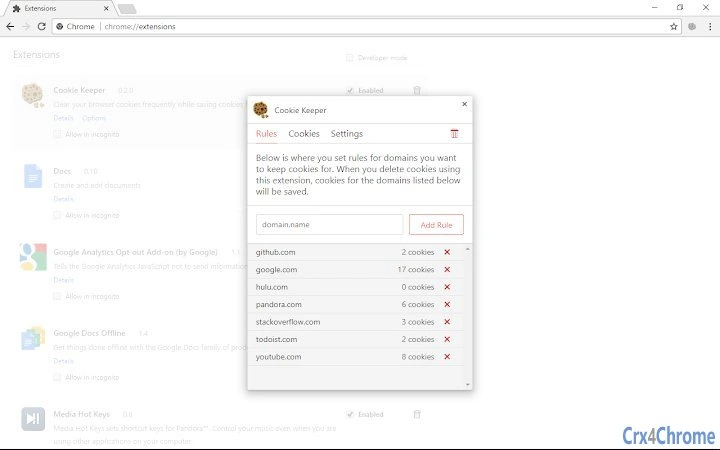
- Rule-Based Cookie Retention: Users can define specific domains to preserve cookies for, ensuring they stay signed in on preferred sites. Rules apply to the domain and all its subdomains, such as
example.com,www.example.com, andblog.example.com. - Automatic Deletion Option: When enabled, the extension automatically removes cookies from domains not listed in the rules. This reduces manual effort and maintains consistent privacy hygiene.
- Manual Cookie Removal per Domain: A dedicated "Cookies" tab allows users to browse stored cookies and delete them individually by clicking the "X" button next to a domain listing.
- Quick Access to Settings: The options page is accessible via the browser toolbar icon or through the Chrome extensions management page at
chrome://extensions. - Privacy-First Design: The extension does not inject code into websites or track browsing activity. It only accesses cookies for deletion purposes and uses minimal permissions.
For example, a user who regularly logs into gmail.com and github.com can add these domains to their rules. All other cookies—especially from advertising networks and analytics platforms—will be removed during cleanup. This approach streamlines browsing while preserving essential session data.
User Interface, Workflow & Performance
The user interface of Cookie Keeper is straightforward and minimalistic, focusing on core functionality without unnecessary distractions. Navigation is intuitive: users access the options page through the toolbar icon or via the Chrome extensions page. The interface is divided into clear sections—Rules, Cookies, and Settings—each serving a distinct purpose.
Workflow efficiency is high for users familiar with browser extensions. Setting up rules involves entering a domain name, with immediate effect on cookie handling. The process of deleting cookies from a specific domain is similarly direct: locate the domain in the list and click the delete button. No additional confirmation steps are required.
Performance observations are based on general software behavior patterns. The extension operates in the background with minimal impact on browser speed. The developer did not specify resource usage details. Stability appears consistent with typical lightweight extensions, though long-term performance under heavy browsing loads was not evaluated.
Compatibility & System Requirements
Cookie Keeper is compatible with Windows, Mac, and Linux operating systems, making it accessible across major desktop platforms. It is designed as a Chrome extension, so it requires Google Chrome to function. The installation size is 2.5 MB, indicating a compact footprint.
Exact system requirements were not listed. The developer did not provide additional information about hardware or software prerequisites. Compatibility information is limited to the supported operating systems and browser environment.
Pros and Cons
Pros
- Simple, focused interface with minimal learning curve
- Effective at removing unwanted cookies while preserving essential ones
- Automatic deletion option reduces manual maintenance
- Lightweight at just 2.5 MB in size
- Privacy-focused design with no data tracking
Cons
- No built-in schedule for automatic cleanups (only manual or on-demand)
- Requires manual setup of domains to keep cookies for
- Only available for Chrome, limiting cross-browser use
- Limited to cookie management—no additional privacy features like tracker blocking
- Does not support wildcard or pattern-based rules (e.g., *.example.com)
FAQ Section
Is Cookie Keeper safe to use?
The extension only accesses cookies stored in the browser and does not collect or transmit user data. It does not inject code into websites or track browsing habits. Permissions are used solely for reading and deleting cookies.
Can I use Cookie Keeper on browsers other than Chrome?
Currently, Cookie Keeper is designed exclusively for Google Chrome. It is not available for Firefox, Edge, or other browsers.
Does Cookie Keeper delete all cookies automatically?
No. It only deletes cookies from domains not included in the user-defined rules. Cookies from allowed domains are preserved. Automatic deletion can be enabled, but it still respects the defined exceptions.
What permissions does Cookie Keeper require?
The extension requests permission to access all sites and their data to read and delete cookies. It also needs storage access to save user rules and settings. Additional permissions are only requested when automatic notifications are enabled.
Can I update Cookie Keeper manually?
Updates are handled automatically by the Chrome Web Store. Users do not need to manually download or install new versions. The latest version is 1.0.1, released on June 15, 2024.
Final Thoughts + CTA
Cookie Keeper delivers a focused, privacy-oriented solution for users seeking better control over browser cookies. Its rule-based system offers a smart compromise between convenience and security, allowing users to stay signed in on essential sites while eliminating tracking cookies. The clean interface and lightweight design make it easy to use without overwhelming the average user.
While it lacks advanced automation and cross-browser support, its core functionality is reliable and well-executed. For individuals who value privacy without sacrificing usability, Cookie Keeper is a strong choice among browser utilities. The fact that it's free and open about its permissions further enhances its appeal.
Download Cookie Keeper now







